A practical, step-by-step guide to attendance, access control, visitors, devices, reports and system administration.
面向实际使用人员的清晰分步操作指南,覆盖考勤、门禁、访客、设备、报表和系统管理。
🌐 Chinese / English中英文切换🔒 Permission aware权限隔离🖥 LAN / Private cloud局域网 / 私有云📅 Updated 3 Aug 2026更新于 2026年8月3日
1Connect devices连接设备
→
2Configure people & rules配置人员与规则
→
3Calculate & approve计算与审批
→
4Lock & export锁定与导出
01
START HERE从这里开始
Quick Start快速开始
⚠ Before business use正式使用前Change the initial administrator password, set the correct time zone, back up the database and keep device ownership information accurate.请先修改初始管理员密码、设置正确时区、备份数据库,并维护准确的设备归属信息。
1
Sign in登录系统
Open the server address, select a system user and enter the password. Remember username stores only the username on a trusted browser. Forgot password shows the safe administrator-reset process.
Set company name, time zone, language, calendar and required modules.
设置公司名称、时区、语言、日历及需要启用的模块。
3
Register devices注册设备
Devices can connect automatically. Complete the name, location, door and sync-group settings after the terminal appears online.
设备可自动连接软件;终端上线后,再完善名称、位置、门点和同步组设置。
4
Build master data建立基础资料
Create departments, employees, shifts, policies and work calendars.
建立部门、员工、班次、规则模板和工作日历。
5
Test calculations验证计算
Use sample punches to verify late, early leave, missing punch and overtime rules.
使用测试打卡验证迟到、早退、缺卡和加班规则。
6
Go live正式上线
Confirm synchronization, user permissions, backups and report exports.
确认人员同步、操作员权限、数据库备份和报表导出。
? Page Help (?)页面帮助(?)Every navigation page provides a contextual help button in the top bar. It explains the module purpose, key fields, recommended workflow and important notes in the current interface language, then links to this complete manual.每个导航页面都在顶部栏提供上下文帮助按钮,按当前界面语言说明模块用途、关键字段、推荐流程和注意事项,并可继续打开本完整说明书。
👤 Recommended reading by role不同岗位应该先看什么
System Administrator系统管理员Read 01–04 and 12–17. Focus on device ownership, roles, backups and logs.重点阅读 01–04、12–17 章,关注设备归属、权限、备份和日志。
HR / Attendance Officer人事 / 考勤员Read 04–10. Focus on employee data, calendars, policies, schedules and report verification.重点阅读 04–10 章,关注人员资料、日历、规则、排班和报表核对。
Security / Reception保安 / 前台Read 03 and 11–13. Focus on live events, visitors, access levels, e-map and remote unlock.重点阅读 03、11–13 章,关注实时事件、访客、门禁权限、电子地图和远程开门。
Manager / Employee经理 / 员工Read 05, 08 and 09. Use the portal for self-service requests and scoped approvals.重点阅读 05、08、09 章,通过自助平台提交申请和处理授权范围内审批。
✓ A setup is complete only when完成标准the device is online, one test employee can synchronize, a known punch produces the expected report result, the operator sees only authorized modules, and a backup can be downloaded.设备在线、测试员工可正常同步、已知打卡能得到预期报表结果、操作员只能看到授权模块,并且数据库备份能够下载。
02
UNDERSTAND THE LOGIC先理解业务逻辑
Core Concepts and Priority核心概念与优先级
Punch Record打卡记录Raw event received from a device. It is evidence, not the final attendance result.设备上传的原始事件,是计算依据,不等于最终考勤结果。
Workday Calendar工作日历Defines whether a date is a workday, rest day, holiday or substitute workday.决定某一天是工作日、休息日、公众假期还是调休上班日。
Shift班次Defines expected time, punch segments, breaks, matching windows and overtime.定义应出勤时间、打卡时段、休息、匹配窗口和加班方式。
Attendance Policy考勤规则Defines how the system evaluates fixed, flexible, smart-match or special attendance.定义固定班次、弹性工时、智能匹配等模式如何判定。
Schedule排班Assigns mode, policy and shift to a department or employee on a date.按日期把考勤模式、规则和班次分配给部门或员工。
Finalization考勤锁定Freezes reviewed results so payroll is not changed by later edits or new logs.冻结已审核结果,防止后续修改或补传记录改变工资依据。
Effective attendance priority考勤生效优先级Employee date schedule → Department date schedule → Employee default → Department default → System default员工指定日期排班 → 部门指定日期排班 → 员工默认设置 → 部门默认设置 → 系统默认设置
🔗 From terminal event to final business result从设备事件到最终业务结果
1Device event设备事件identity, time, result, snapshot身份、时间、结果、抓拍
Access result门禁结果Whether the terminal allowed or denied entry at that moment.终端当时是否允许通行。
Punch record打卡记录The time evidence used by attendance; it may exist even when access is denied, depending on device behavior.用于考勤的时间证据;是否在拒绝通行时产生记录取决于设备行为。
Calculated result计算结果The business result generated from records plus calendar, schedule, leave and approval data.原始记录结合日历、排班、请假和审批后生成的业务结果。
03
DAILY OPERATIONS日常运营
Operations Center and Query Assistant指挥中心与查询助手
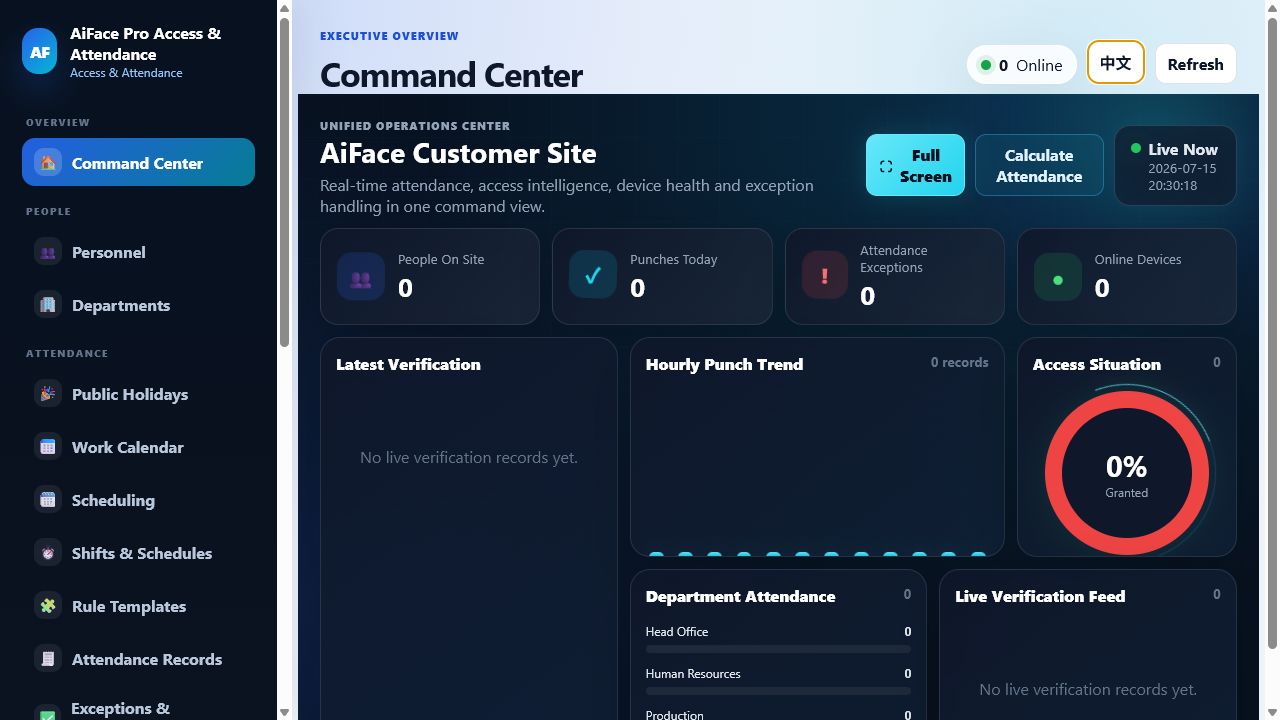
🏠 Operations Center指挥中心
Shows online devices, people on site, attendance exceptions, live access ratios, latest verification photo and event feed.
显示在线设备、当前在岗、考勤异常、门禁态势、最新验证照片和实时事件。
Check online and exception totals first.
先看在线设备和异常总数。
Use Full Screen at a security desk.
保安室值守时使用全屏。
🔎 Smart Query Center智能查询中心
Function Navigation is the default. Find a function from a daily task, review its menu path and recommended steps, then open the module directly or open it with Page Help.
Try: Add Employee, Schedule Employee, Process Missing Punch, Export Monthly Report, Set Device Location, or Database Backup.
可尝试:新增员工、员工排班、处理缺卡、导出月报、设置设备位置或数据库备份。
Only modules available to the current operator are accessible.
仅可进入当前操作员有权使用的模块。
Business Data Query remains a secondary tab for permission-aware, rule-based, read-only queries. It is not generative AI and cannot modify business data.“业务数据查询”保留为次级页签,按权限通过预设规则只读查询;它不是生成式 AI,也不会修改业务数据。
Operations Center example指挥中心示例
04
MASTER DATA基础资料
Employees, Departments and Sync Groups人员、部门与同步组
👥 Employee Management人员管理
Maintain one canonical Employee ID, name, department, job title, employment dates and contact data.
维护唯一员工 ID、姓名、部门、岗位、入离职日期和联系方式。
Upload a clear 480×640 (3:4) enrollment photo.
上传清晰的 480×640(3:4)注册照片。
Review face, fingerprint and palm-vein enrollment status synchronized from connected terminals.
查看从已连接设备同步回来的人员人脸、指纹和掌静脉登记状态。
Use Excel import for batches; preview before device enrollment.
批量人员使用 Excel 导入;注册设备前先预览。
🏢 Departments部门管理
Create parent departments before child departments.
先建立上级部门,再建立下级部门。
Department scope controls reports, managers and approval visibility.
部门范围用于控制报表、主管和审批可见数据。
Use batch assignment when moving multiple employees.
多人调动时使用批量设置部门。
🏷 Tags & Employee Sync Groups标签与人员同步组
One employee belongs to one sync group; a device may accept multiple groups.
一个员工只能属于一个同步组,一台设备可以接收多个同步组。
Use preview to see Add, Update, Keep, Conflict and Remove actions.
通过预览查看新增、更新、保留、冲突和移除。
Never blindly overwrite conflicting identities.
出现身份冲突时禁止无条件覆盖。
🔐 Privacy option隐私选项Disable employee-photo display when local privacy requirements prohibit visible portraits.如客户有隐私要求,可关闭人员照片显示。
Register and verify biometric credentials登记并核对生物识别凭证
Open the employee editor and review Device-side Enrollment Status. The software displays synchronized status only and never exposes raw biometric templates.
打开员工编辑页并查看“设备端登记状态”;软件只显示同步状态,不展示原始生物特征模板。
Select an online terminal and credential type under Remote Credential Registration.
在“远程凭证登记”中选择在线设备和凭证类型。
Send the registration command, then complete fingerprint or static-face capture at the terminal within the response window.
发送登记命令后,在响应时限内到设备端完成指纹或静态人脸采集。
Synchronize device personnel again and confirm the credential status and Verification Methods shown in attendance reports.
再次同步设备人员,并核对人员凭证状态及考勤报表中的“验证方式”。
Credential types, slots and remote capture behavior depend on the terminal model and firmware. Not Detected does not prove that the hardware is unsupported.凭证类型、槽位和远程采集行为取决于设备型号与固件;“未检测到”不等于硬件一定不支持。
Safe employee import and device distribution安全导入人员并下发设备
Download the current Excel template; do not rename required columns.
下载当前 Excel 模板,不要修改必填列名。
Use one unique Employee ID for both software and device enrollment; verify department and sync group.
软件与设备登记共同使用一个唯一员工 ID,并核对部门及同步组。
Select the XLSX and any named 3:4 photos together, then review invalid rows before committing.
将 XLSX 与按员工 ID 命名的 3:4 照片一起选择,导入后先检查无效行。
Preview target-device actions before synchronization.
同步前先预览目标设备操作。
Resolve identity conflicts manually; synchronize only Add/Update items that were confirmed.
人工处理身份冲突,只同步已确认的新增和更新项目。
🧭 Key identity fields关键身份字段
Employee ID员工 IDThe one identifier used in personnel records, reports, Excel import and device enrollment.人员档案、报表、Excel 导入和设备登记共同使用的唯一编号。
Legacy Device ID Mapping设备历史 ID 映射Internal compatibility mapping retained for historical device identities; users do not enter it.系统内部保留的旧设备身份兼容映射,普通用户无需填写。
Sync Group同步组Controls which devices should receive the employee.决定该员工应该下发到哪些设备。
Employment Status雇佣状态Archived employees leave active lists but remain available for historical reports.归档人员不再出现在在职列表,但历史报表仍可查询。
05
MOBILE SELF-SERVICE移动自助
Employee and Manager Portal员工与经理自助平台
📱 Employee functions员工功能
View punches, schedules, attendance results, leave balances and messages.
查看打卡、排班、考勤结果、假期余额和消息。
Submit leave, missing-punch, overtime and facility requests.
提交请假、补卡、加班和场地申请。
Invite a visitor and share the approval result, link or QR code.
邀约访客,并分享审核结果、链接或二维码。
✅ Manager functions经理功能
Review team attendance and exceptions within assigned departments.
查看授权部门内团队到岗和异常。
Approve or reject leave, corrections, overtime and facility requests.
审批请假、补卡、加班和场地申请。
Managers cannot see data outside their department scope.
经理不能查看权限部门范围以外的数据。
How to enable启用步骤
Create the employee record and portal account.
建立员工档案和自助账号。
Share the Portal link or QR code from Employee Self-Service.
在“员工自助平台”页面分享入口链接或二维码。
Assign manager scope before enabling approvals.
启用经理审批前,先设置部门管理范围。
📍 Field Check-In Evidence外勤打卡佐证
Open Field Check-In in the employee portal, allow camera and precise location permissions, and take a current photo.
在员工自助平台打开“外勤打卡”,允许相机和精确定位权限,并拍摄当前现场照片。
GPS uses browser WGS84 coordinates worldwide. Overseas networks can use OpenStreetMap address lookup; in China or restricted networks, an address lookup failure does not block saving the coordinates and photo.
Photos are compressed before upload to a maximum long edge of 1280 pixels for faster mobile transfer, and the server normalizes the image again.
照片会在上传前压缩,最长边不超过 1280 像素以提升移动网络速度;服务器还会再次标准化图片。
Administrators review the separate Field Check-Ins table under Punch Records, including photo, server time, coordinates, accuracy, address and note.
管理员在“考勤记录”的独立“外勤打卡”表中查看照片、服务器时间、坐标、精度、地址和备注。
Field Check-Ins never enter attendance calculation, attendance reports or payroll preview. They are evidence records only and do not replace face-terminal attendance.外勤打卡永不进入考勤计算、考勤报表或薪资预核算,仅作到场佐证,也不替代人脸设备考勤。
06
WORKING DAYS工作日期
Holiday Calendar and Workday Calendar公众假期与工作日历
🎉 Holiday Calendar公众假期
Stores public holidays, paid-holiday status, holiday overtime and substitute workdays.
维护公众假期、是否带薪、是否计算节假日加班及调休上班日。
Enter local and English names.
填写本地名称和英文名称。
Select start and end dates using the calendar control.
使用日历控件选择开始和结束日期。
Set Holiday OT to Yes only when work on that holiday counts as holiday overtime.
只有节假日工作需要算节假日加班时,才启用 Holiday OT。
📅 Workday Calendar工作日历
Shows and overrides workdays, rest days and special days by month.
按月查看并调整工作日、休息日和特殊日期。
Select a month or range.
选择月份或日期范围。
Set day type, attendance requirement and overtime category.
设置日期类型、是否应出勤和加班类别。
Click an individual day for an urgent adjustment.
突发调班时可点击单日调整。
07
THE HEART OF ATTENDANCE考勤核心
Shifts, Policy Templates and Scheduling班次、规则模板与排班
Fixed Shift固定班次Compares punches with scheduled start/end and calculates late, early leave and missing punches.按计划上下班时间计算迟到、早退和缺卡。
Flexible Hours弹性工时Uses actual worked minutes after configured break deductions; a fixed shift is normally unnecessary.按实际工作分钟扣除休息后计算,通常不需要固定班次。
Smart Match智能匹配Automatically selects the closest eligible shift from actual punches.根据实际打卡自动匹配最合适的可用班次。
No Attendance不参与考勤Keeps access identity but excludes the employee from attendance calculation.保留门禁身份,但不参与考勤计算。
Recommended configuration order推荐设置顺序
Create the shift: start/end, grace periods, breaks, punch segments, workdays and overtime rounding.
建立班次:上下班时间、宽限、休息、打卡时段、工作日和加班取整。
Create an attendance policy and link its applicable shift when required.
建立考勤规则,并在需要时关联适用班次。
In Scheduling, select attendance mode first; irrelevant fields are not required.
排班时先选择考勤模式,无关字段无需填写。
Publish department schedules, then add employee exceptions only when needed.
先发布部门排班,仅在有差异时设置员工排班。
⚠ Avoid conflicting settings避免设置冲突Do not assign a fixed shift to a flexible employee unless the selected policy explicitly requires it. Test every new policy with known punches before rollout.弹性工时员工不要重复设置固定班次,除非所选规则明确要求。新规则上线前必须用已知打卡进行验证。
🧩 Shift fields in plain language班次字段通俗解释
Start / End开始 / 结束Expected duty window. Overnight shifts may end on the next day.计划出勤区间;跨夜班次的结束时间可以在次日。
Grace Period迟到 / 早退宽限Minutes tolerated before late arrival or early departure is counted.超过该分钟数后才计迟到或早退。
Punch Window打卡匹配窗口How far before/after a shift a punch may be matched. It is not paid work time.班次前后多长时间内的打卡可以匹配;它不等于计薪工时。
Punch Segments打卡时段Defines whether only first/last punches or also lunch in/out punches are required.决定只要求早晚打卡,还是午休进出也必须打卡。
Break Deduction休息扣除Fixed deduction or actual paired-break calculation, according to the shift.根据班次选择固定扣除或按成对休息打卡计算。
Overtime Threshold / Rounding加班门槛 / 取整Minimum eligible overtime and reporting unit; e.g. 40 minutes rounded down to 30.最低可计加班时间和报表单位,例如 40 分钟向下取整为 30 分钟。
🧪 Minimum rule test set规则最低测试集Normal day · grace-period arrival · late arrival · early leave · missing punch · overnight shift · rest-day work · holiday work · approved leave · approved overtime.正常出勤、宽限内到岗、迟到、早退、缺卡、跨夜班、休息日上班、节假日上班、已批准请假、已批准加班。
08
SPECIALIZED OPERATIONS专业值守
Duty Management, Handover and Presence Tracking值班管理、交接班与在岗跟踪
This module records actual operator time on a post or production line. It does not stop or control production equipment.
本模块用于记录操作员在岗位或生产线上的实际工作时间,不停止或控制生产设备。
🛡 Duty Post值班岗位
Bind the department, terminal, shift, supervisor and tracking policy.
绑定部门、终端、班次、主管和在岗跟踪规则。
🔁 Handover交接班
RFID or Face ID starts the next operator; the previous session closes automatically on the same terminal.
刷卡或刷脸开始下一位操作员会话,同一终端上的上一会话自动结束。
⏱ Presence Check在岗确认
Configure interval, response window and optional Strict Mode. Missed checks enter Message Center.
设置确认间隔、响应时限和可选严格模式;漏确认自动进入消息中心。
Terminal questionnaire设备问卷
Synchronize the questionnaire to the selected terminal. Normal answers create a confirmation record; abnormal answers create an event for the supervisor. Reports include sessions, checks, missed checks, exact timestamps and daily/monthly totals.
📸 Photo rule照片规则When capture-photo retrieval is enabled, reports and live views use the event snapshot first and the enrollment photo only as fallback. The two photo sources remain separate.启用抓拍照片后,报表和实时页面优先使用打卡抓拍照片,没有抓拍时才使用注册照片;两种照片来源始终分开保存。
Correct an attendance exception处理一条考勤异常
Open Punch Records and confirm whether the raw event exists.
先打开考勤记录,确认原始事件是否存在。
Check the employee mapping, calendar, effective mode, policy and shift for that date.
检查当天的人员映射、日历、考勤模式、规则和班次。
If evidence is missing, submit a manual punch or leave/overtime request with a reason.
如确实缺少依据,提交补卡、请假或加班申请并填写原因。
Approve through the authorized manager, then recalculate the affected date.
由有权限的经理审批,再重新计算受影响日期。
Verify the result in Daily Report before finalizing the period.
锁定期间前,在日报表核对最终结果。
🧾 Audit principle留痕原则Do not delete a valid device event to make a report look correct. Keep source evidence and use an approved correction so the operator, reason and time remain traceable.不要为了让报表正确而删除有效设备事件。应保留原始依据并使用审批后的调整,确保操作人、原因和时间可追溯。
10
REVIEW AND HANDOVER审核与交接
Attendance Reports and Payroll Preview考勤报表与薪资预核算
1Calculate计算
→
2Filter exceptions筛选异常
→
3Correct & recalculate修正并重算
→
4Lock period锁定期间
→
5Export导出
📊 Daily Report日报表
Detailed employee-by-day result: policy, calendar, shift, first/last punch, status, late, early leave, work time, required time, absence, leave and overtime.
按员工和日期显示规则、日历、班次、首末次打卡、状态、迟到、早退、工时、应出、旷工、请假和加班。
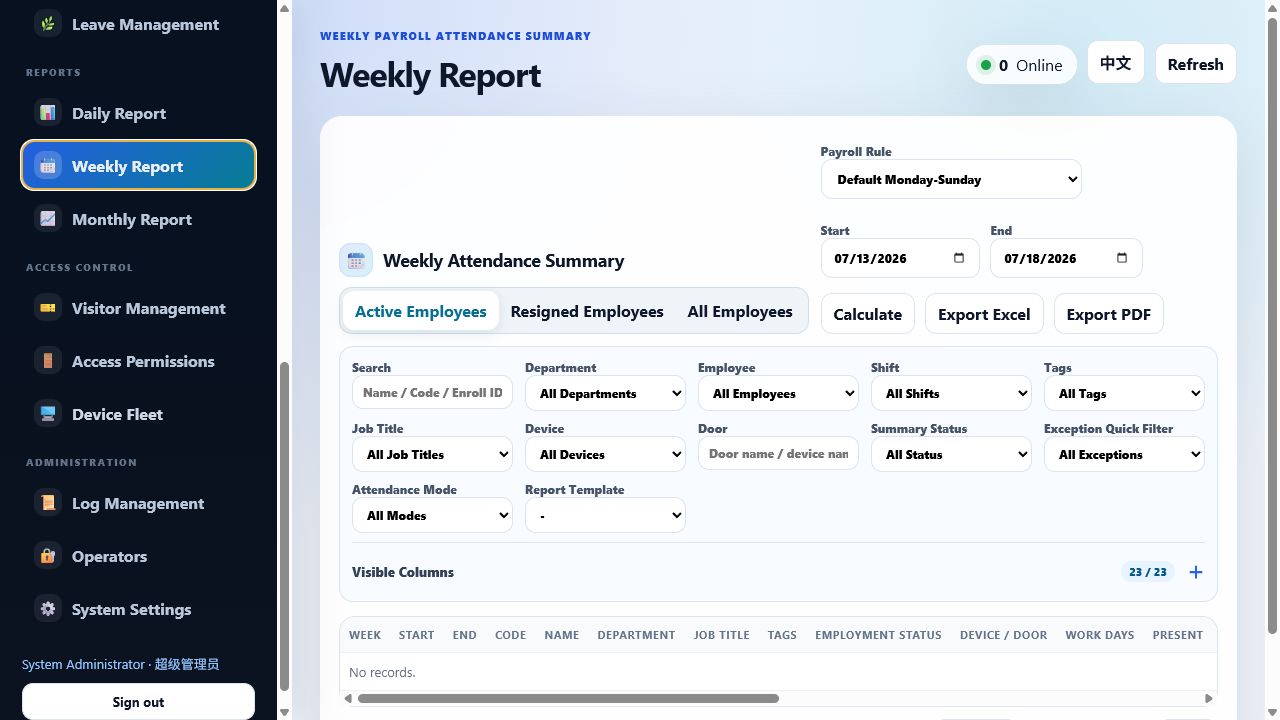
📆 Weekly Report周报表
Seven-day summary for weekly payroll. A payroll period must be a continuous complete week.
用于周薪的连续七天汇总;薪资期间必须是完整连续的一周。
📈 Monthly Report月报表
Full calendar-month summary for management and monthly payroll review.
完整自然月的出勤、异常、请假和加班汇总,用于管理和月薪复核。
🧮 Calculation rule计算口径Work time is displayed as HH:MM. Late and early-leave minutes reduce actual attendance time where the configured policy requires it. Weekday, weekend and public-holiday overtime use separate rules and multipliers.工时以 HH:MM 显示;在规则要求时,迟到和早退分钟会从实际出勤时间扣减。平日、周末和公众假期加班分别使用独立规则和倍率。
💰 Payroll Preview薪资预核算
Configure employee pay profiles, customer-defined earnings/deductions and three overtime categories. Generate only from finalized attendance, review the batch, approve it and export Excel for finance. This is an attendance-based estimate; it does not calculate country-specific tax, social insurance or final payroll.
Required Time应出Scheduled minutes after calendar and approved full-day leave rules.根据日历和已批准整天请假规则计算的应出勤分钟。
Work Time工时Calculated attendance time after configured breaks and applicable late/early deductions, shown as HH:MM.按规则扣除休息及适用的迟到早退后得到的出勤时间,以 HH:MM 显示。
Absence旷工Required minutes not covered by valid attendance, approved leave or approved correction.应出勤时间中未被有效出勤、已批准请假或调整覆盖的分钟。
Overtime加班Eligible minutes after threshold, rounding, day category and approval rules.经过门槛、取整、日期类别和审批规则后可计入的分钟。
Finalized已锁定Reviewed result frozen for payroll handover; later source changes require controlled reopening.已审核并冻结用于薪资交接;后续源数据变化必须受控解锁。
Employment Scope员工范围Active, archived or all employees are separated to protect historical reports.在职、离职或全部员工分开筛选,保证历史报表完整。
Recommended month-end process推荐月末结算流程
Calculate the entire period and filter every exception category.
计算完整期间,并逐类筛选所有异常。
Complete leave, correction and overtime approvals; recalculate affected dates.
完成请假、补卡和加班审批,重算受影响日期。
Compare 5–10 sampled employees with manual calculations.
抽取 5–10 名员工与人工计算结果对比。
Lock the period, export Excel/PDF, then generate payroll preview.
锁定期间,导出 Excel/PDF,再生成薪资预核算。
Store the approved exports together with a database backup.
将已审核导出文件和数据库备份一起归档。
11
RESERVATION ACCESS预约通行
Facility Access and Visitor Management场地管理与访客管理
🏟 Facility Access场地管理
Lightweight reservation access for meeting rooms, gyms, pools and clubs.
面向会议室、健身房、泳池和俱乐部的轻量预约门禁。
Create the facility and bind its access device.
创建场地并绑定门禁设备。
Set capacity, opening hours, approval and welcome message.
设置容量、开放时间、审批和欢迎信息。
Approve, check in, complete or cancel the booking.
审批、签到、完成或取消预约。
🎫 Visitor Management访客管理
Manages application, approval, check-in/out and time-limited TIMY QR credentials.
管理访客申请、审批、签到签退和限时 TIMY 二维码凭证。
Select device, validity window and swipe limit.
选择设备、有效时段和通行次数。
Issue static QR or dynamic web pass according to system settings.
根据系统设置签发静态二维码或动态网页通行码。
Revoke the credential immediately when a visit is cancelled.
访问取消时立即撤销凭证。
Facility approval is a separate operator capability. Employees submit requests in the portal; assigned managers approve only within their department scope.场地审批是独立操作权限。员工在自助平台提交申请,获授权经理只能审批本人部门范围内的申请。
🎟 Visitor credential fields访客凭证关键字段
Validity Window有效时段The QR is accepted only between the configured start and end time.二维码只在设置的开始和结束时间之间有效。
Use Limit通行次数00 means unlimited during validity; another value limits successful uses.00 表示有效期内不限次数,其他数值限制成功通行次数。
Static QR静态二维码Easy to send and print; revoke it if the visit changes or the code is exposed.便于发送和打印;访问变更或二维码泄露时应立即撤销。
Dynamic Web Pass动态网页通行码A web link refreshes the displayed credential; public use requires a reachable HTTPS domain.通过网页链接刷新显示凭证;公网使用需要可访问的 HTTPS 域名。
12
WHO CAN ENTER WHERE AND WHEN谁在什么时间可以进入哪里
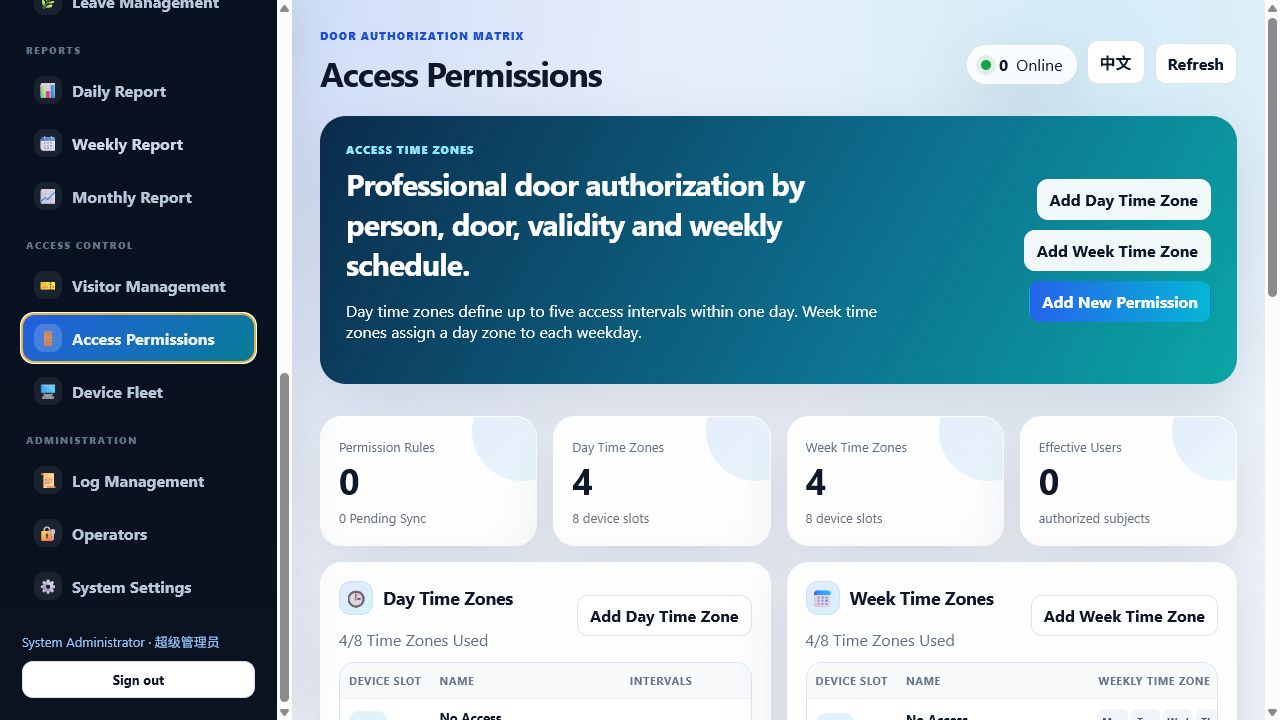
Access Levels, Floor E-Map and Global Device Map门禁权限、平面电子地图与全球设备地图
Create daily time zones with non-overlapping intervals.
建立日时段,同一天的时间区间不能重叠。
Build a weekly schedule from Monday to Sunday.
把日时段组合成周一至周日的周时段。
Select multiple users and multiple devices, set validity, then synchronize.
多选人员和设备,设置有效期后同步。
🗺 Interactive E-Map门禁电子地图
Upload a floor plan, drag door markers, view online/offline state and recent granted/denied events, inspect snapshots and remotely open a door.
上传平面图、拖动门点、查看在线/离线及最近允许/拒绝事件、查看抓拍并远程开门。
View, remote control and layout editing are three separate permissions. Every remote action is logged.查看、远程控制、布局编辑是三种独立权限;所有远程操作均记录日志。
🌍 Global Device Map全球设备地图
Displays geographically positioned devices on OpenStreetMap. Green means online and red means offline.
在 OpenStreetMap 上显示已设置地理位置的设备;绿色表示在线,红色表示离线。
Edit a device and set latitude/longitude by clicking the map, dragging the marker or entering both values.
编辑设备,通过点击地图、拖动标记或成对输入经纬度设置位置。
Use search and status filters, then click a marker or device card to focus the same terminal.
使用搜索和状态筛选,点击地图标记或设备卡片可联动定位同一台设备。
Use Full Screen for project displays; click Exit Full Screen or press Esc to return.
项目大屏展示时使用全屏显示;点击“退出全屏”或按 Esc 返回。
Leaflet is served locally; OpenStreetMap tiles still require internet access.
Leaflet 已由系统本地提供;OpenStreetMap 地图瓦片仍需互联网访问。
Keep the OpenStreetMap attribution visible.
必须保留 OpenStreetMap 地图署名。
Access-level configuration example门禁授权设置示例
🔒 Access acceptance test门禁验收测试Test one allowed time, one denied time, one expired authorization and one unauthorized user on every door. The device result, live feed and access log must agree.每个门点至少测试一次允许时段、拒绝时段、过期授权和未授权人员;设备结果、实时事件和门禁日志必须一致。
13
TERMINAL FLEET终端设备
Devices, Commands and Multi-Device Synchronization设备、命令与多设备同步
Register a new device新增设备
Configure the terminal WebSocket address and let it connect to the software.
先在终端配置 WebSocket 地址,让设备连接软件。
Open Devices & Doors and complete the name, location, door, optional MAC address and geographic position.
在“设备与门”完善名称、位置、门点、可选 MAC 地址和地理位置。
Assign accepted personnel sync groups.
设置该设备接收哪些人员同步组。
Preview the initial employee synchronization and explicitly confirm it.
预览首次人员同步并明确确认。
🛠 Command Center设备命令中心
Read/synchronize time, query capacity and door state, retrieve logs, retrieve users/photos, restart and remote unlock. Review every response in command logs.
The system compares employee identity and photo state before sending changes. Conflicts are quarantined for review instead of silently replacing the local record.
系统在发送变更前比较人员身份和照片状态;冲突进入审核,不会静默覆盖本地档案。
🧬 Biometric Capabilities生物识别能力
The device editor summarizes face, fingerprint and palm-vein support from capacity responses, firmware evidence and synchronized credentials.
设备编辑页根据容量响应、固件证据和已同步凭证汇总人脸、指纹和掌静脉能力。
Supported is evidence-based. Not Detected means that the software has not yet collected enough evidence; confirm on the real terminal and firmware before promising a feature.“支持”基于已获取证据;“未检测到”表示证据不足,承诺功能前必须在真实设备和固件上确认。
⚠ Device connection设备连接Devices connect by serial number automatically. Use accurate device records, optional MAC binding, device deletion and access rules to manage security.设备按序列号自动连接软件。请通过准确的设备档案、可选 MAC 绑定、删除设备和门禁权限规则管理安全。
🔄 Multi-device synchronization routine多设备同步机制
Situation场景Recommended action推荐动作Safety check安全检查
New device新增设备Assign device sync groups, run preview, then send the current approved master data.设置设备同步组,运行预览,再下发当前已确认的完整主数据。No unexpected Remove or identity conflict.不得出现非预期移除或身份冲突。
New employee新增员工Assign one sync group; the system targets every active device accepting that group.给员工设置一个同步组,系统定位所有接收该组的启用设备。Enrollment ID is unique on every target.登记 ID 在所有目标设备上唯一。
Employee update人员变更Distribute only changed identity/photo data and keep per-device status.只下发发生变化的身份/照片数据,并保留每台设备状态。Failed targets stay pending for retry.失败目标保留待重试状态。
Archive / transfer归档 / 调动Preview removals from old groups and additions to new groups before execution.执行前预览旧组移除和新组新增。Historical software records remain intact.软件历史记录必须保留。
Personnel synchronization queue人员同步队列
The first synchronization of a new device requires an explicit preview and confirmation.
新设备首次同步必须先预览并明确确认。
After initialization, approved employee, photo and sync-group changes create per-device queue items.
初始化后,已确认的人员、照片和同步组变更会生成逐设备队列任务。
Offline targets remain pending instead of being discarded. Review failed items, error messages and retry results before closing the task.
离线目标会保留为待处理而不会丢弃;关闭任务前应检查失败项、错误信息和重试结果。
Do not delete or archive a device while it still has unresolved synchronization work.
设备仍有未完成同步任务时,不要直接删除或归档设备。
14
ALERTS AND CONNECTIVITY告警与对接
Message Center and System Integrations消息中心与系统集成
🔔 Message Center消息中心
For human recipients. It combines operational events, alert handling and notification delivery.
用于向人员发送信息,统一管理业务事件、异常处理和消息投递。
Create a channel account and send a test message.
创建渠道账户并发送测试消息。
Create recipients/groups, an easy template and a notification rule.
建立收件人/分组、易读模板和通知规则。
Monitor queue, failures and retries.
监控发送队列、失败和重试。
Supported channel configuration includes Telegram, LINE, Viber and WeCom; availability depends on each provider's official API.
可配置 Telegram、LINE、Viber 和企业微信;实际可用性取决于各平台官方接口。
🔌 System Integrations系统集成
For software-to-software data exchange.
用于软件系统之间交换数据。
Webhook
AiFace actively pushes subscribed events to another server, with signatures, delivery logs and retry.
AiFace 主动向其他服务器推送订阅事件,支持签名、投递日志和重试。
API Token
Another authorized system reads or writes only the scopes granted to its token.
其他获授权系统只能读取或写入令牌被授予的权限范围。
Use Message Center when the receiver is a person. Use Webhook/API when the receiver is another software system. Tokens and channel secrets must never be shared in screenshots or ordinary documents.接收者是人员时使用消息中心;接收者是其他软件时使用 Webhook/API。令牌和渠道密钥禁止出现在截图或普通文档中。
Notification setup in the correct order消息通知正确设置顺序
Create a channel account from an official provider token or corporate webhook, then send a test message.
使用官方平台令牌或企业 Webhook 建立渠道账户,并先发送测试消息。
Create recipients: management group, department supervisor, employee or student guardian.
建立收件人:管理层分组、部门主管、员工本人或学生家长。
Choose a guided template, select fields and optionally include the event snapshot.
选择引导式模板,勾选需要的字段,并可选择附带事件抓拍照片。
Create a rule: event type, severity, people/device scope, recipient group and quiet period.
建立规则:事件类型、严重程度、人员/设备范围、收件人组和静默时段。
Trigger one real test event and verify delivery queue, photo and retry log.
触发一条真实测试事件,核对发送队列、照片和重试日志。
🔌 Choose the correct integration如何选择对接方式
Message Channel消息渠道Send readable notices to people through Telegram, LINE, Viber or WeCom.通过 Telegram、LINE、Viber 或企业微信向人员发送可读通知。
WebhookPush an event immediately to a customer server; use signatures and retry logs.事件发生时立即推送到客户服务器,使用签名并记录重试日志。
API TokenAllow another application to request approved data or operations within explicit scopes.允许其他应用在明确授权范围内主动请求数据或操作。
Event Snapshot事件抓拍Uses the punch/access snapshot when available; enrollment photo is not silently substituted unless configured.优先使用打卡/门禁抓拍;除非明确配置,否则不会静默替换为注册照片。
15
CONTROL AND SAFETY控制与安全
Logs, Users, Database and System Configuration日志、操作员、数据库与系统设置
📜 Logs & Audit Trail日志管理
Filter attendance, access, device commands and administrative actions by date, device, actor, module and result.
按日期、设备、操作员、模块和结果筛选考勤、门禁、设备命令及管理操作。
🔐 Users & Roles操作员管理
Assign module visibility, capability permissions and data scope separately. Use least privilege.
分别设置菜单模块、操作能力和数据范围,遵循最小权限原则。
🗄 Database Maintenance数据库管理
Review integrity and runtime health, schedule automatic backups, manage the backup library, control restore and govern capture-photo retention.
检查完整性和运行健康,设置自动备份,管理备份库,受控恢复并治理抓拍照片保留期。
⚙ System Configuration系统设置
Configure URL, time zone, localization, calendar, branding, optional modules, photos, visitor QR mode and the global-map tile address. The current semantic version appears on the login page and sidebar; record it before every upgrade or support request.
Module permission模块权限Controls whether the menu and API resource are available.控制菜单是否显示,以及对应 API 是否可访问。
Capability permission操作能力Controls sensitive actions such as remote unlock, map edit or venue approval.控制远程开门、地图编辑、场地审批等敏感操作。
Data scope数据范围Controls all-company, selected-department or self-only visibility.控制全公司、指定部门或仅本人数据可见范围。
System configuration example系统设置示例
Safe backup and restore practice安全备份与恢复方法
Create a backup before upgrades, imports, bulk synchronization or payroll finalization.
升级、批量导入、大规模同步或薪资锁定前先创建备份。
Download a copy to storage outside the application server.
下载一份到应用服务器以外的存储位置。
Record date, software version, database size and operator in the backup register.
在备份登记中记录日期、软件版本、数据库大小和操作员。
Restore only in a maintenance window after backing up the current database.
恢复前先备份当前数据库,并在维护窗口内执行。
After restore, verify login, device registry, latest punches, report totals and operator permissions.
恢复后验证登录、设备注册表、最新打卡、报表汇总和操作员权限。
🩺 Reliability controls可靠性控制
Automatic Backup自动备份Choose an enabled state, daily execution time and number of local backups to retain. A local backup is not a substitute for an off-host copy.设置是否启用、每日执行时间和本地保留份数;本地备份不能替代异机备份。
Runtime Monitoring运行监控Review uptime, online devices, free disk space, WAL size, capture queue and photo failures. Investigate sustained growth or repeated failures.查看运行时长、在线设备、磁盘剩余空间、WAL 大小、抓拍队列和照片失败数;持续增长或重复失败必须排查。
Controlled Restore受控恢复Uploaded SQLite files are validated before entering the backup library. Restore creates a safety backup first and signs out all users.上传的 SQLite 文件通过校验后才进入备份库;恢复前系统会自动创建安全备份,并在恢复后注销所有用户。
Photo Governance照片治理Preview eligible old device attendance captures and field check-in photos before cleanup. Their records, times and locations remain; registered employee photos are protected and are never removed by this policy.清理前先预览符合条件的旧设备考勤抓拍和外勤打卡照片;记录、时间和位置仍会保留,员工注册照片受保护且不会被该策略删除。
16
WHEN SOMETHING IS WRONG出现问题时
Troubleshooting常见问题处理
The device is offline设备显示离线
Confirm network reachability, WebSocket URL, serial-number registration and authorization. Then check device and command logs.
检查网络连通、WebSocket 地址、序列号注册和授权,再查看设备日志及命令日志。
Reports show no data or unexpected absence报表无数据或出现异常旷工
Check employee hire/resignation dates, workday calendar, effective schedule, enrollment-ID mapping and raw punch records. Recalculate after correcting the source.
检查入离职日期、工作日历、生效排班、登记 ID 映射和原始打卡;修正源数据后重新计算。
A period cannot be recalculated考勤期间无法重新计算
The period may be locked. Verify payroll dependency and approval status before voiding or unlocking a result.
该期间可能已锁定。作废或解锁前,先确认薪资依赖和审批状态。
A user cannot see a menu or receives 403操作员看不到菜单或出现 403
Review module permission, capability permission and data scope. Sign out and in again after permission changes.
检查模块权限、操作能力和数据范围;权限修改后重新登录。
Employee synchronization reports a conflict人员同步出现冲突
Compare Employee ID, name, device source and photo. Merge only after confirming both records represent the same person.
比较员工 ID、姓名、设备来源和照片;确认是同一人后才能合并。
Excel/PDF export failsExcel/PDF 导出失败
Confirm a valid date range and permission, calculate/preview the report first, then check the browser download and server logs.
确认日期范围和权限有效,先计算/预览报表,再检查浏览器下载和服务器日志。
Device says denied but the software shows granted设备显示拒绝,但软件显示允许
Compare the same event by serial number, enrollment ID and timestamp. Confirm the terminal response field is mapped as the authoritative access result and that no older cached event is displayed. Refresh live data and inspect the raw protocol log before changing permissions.
按设备序列号、登记 ID 和时间戳对比同一事件,确认终端返回字段被作为权威门禁结果,并排除页面显示旧缓存事件。修改权限前先刷新实时数据并检查原始协议日志。
A WeCom notification has text but no photo企业微信通知有文字但没有照片
Verify the rule enables Event Snapshot, the event contains a stored capture path, the file is a supported image and the channel account can upload media. Then inspect the delivery log for media upload errors.
An expired visitor application cannot be submitted again过期访客申请无法重新提交
Open a fresh application link or use Apply Again. The new application must create a new visit and credential instead of reopening the expired QR. Revoke the old credential if it is still listed as active.
Attendance totals do not match manual calculation考勤汇总与人工计算不一致
Choose one employee and date, then verify in order: raw punches, calendar day type, effective attendance mode, policy, matched shift, breaks, approvals, overtime category and rounding. Recalculate only after correcting the first inconsistent source.
Narrow the date range, use pagination and confirm image thumbnails are optimized. For the Operations Center, check device/event API response time and avoid loading full-resolution snapshots until opened.
The global device map shows text but no map全球设备地图只有文字,没有地图
Leaflet is served locally. Confirm access to OpenStreetMap tiles, refresh the browser cache and verify that latitude and longitude are saved together. The device list remains usable when map tiles are unavailable.
Remote credential registration does not complete远程凭证登记没有完成
Confirm the terminal is online, the selected credential type is supported by its firmware, and the operator completed capture at the device before timeout. Review the command response, then synchronize personnel again.
Automatic backup or photo cleanup reports an error自动备份或照片清理报错
Check free disk space, data-directory permissions, scheduled time and the latest error shown in Database Maintenance. Run a manual backup or cleanup preview before retrying automation.
🧰 Information to collect before support联系技术支持前准备Software version · exact time · operator · module · device serial number · employee enrollment ID · screenshot · browser error · relevant device/operation log. Never send passwords, API tokens or channel secrets.软件版本、准确时间、操作员、模块、设备序列号、人员登记 ID、截图、浏览器错误和相关设备/操作日志。禁止发送密码、API 令牌或渠道密钥。
17
FINAL VERIFICATION最终确认
Go-Live Checklist正式上线检查表
✓ Recommended acceptance method推荐验收方法Select 5–10 employees covering every attendance mode, run one complete payroll period with known punches, and obtain written confirmation from HR before full rollout.选择 5–10 名覆盖全部考勤模式的员工,用已知打卡跑完一个完整计薪周期,并由人事书面确认后再全面上线。
📝 Suggested customer acceptance record建议客户验收记录
Test case测试场景Employee, date, device, shift/policy and expected result.员工、日期、设备、班次/规则和预期结果。
Evidence测试依据Raw punches, device result, snapshot and approval documents.原始打卡、设备结果、抓拍和审批单据。
Actual result实际结果Daily/weekly/monthly values and export file.日报/周报/月报数据和导出文件。
Sign-off验收确认HR owner, system administrator, date and follow-up item.人事负责人、系统管理员、日期和待跟进事项。